
⚠️ Please note that the following functionality is only available to Administrators.
Adding a User
Begin by selecting the Company Tab ("SafetyLine QA" in the example below), and click on "Settings."
In "Company Settings" select "Add User."
On the first page, you will need to enter the following:
- First and Last Name
- Login Email
- User Group
- User Privileges
- User Language
When finished, select 'Next' to proceed.
On the second page, you will need to enter the following:
- Phone Number
- User ID (numeric only; typically an employee ID, or the last 4-5 digits of the user's phone number)
- Passcode (numeric only)
⚠️In order to add a User to your SafetyLine account, you will require an available User License.
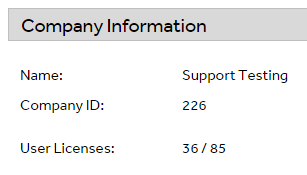
User Licenses can be viewed on the Company Summary page. In the example above, 36 out of 85 possible licenses are used. If you require additional licenses, contact your SafetyLine Account Manager.
Deleting a User
To delete a User, navigate to the individual User profile, then select "Delete User."
Related Articles